
Dollar Tree Workday is the employee self-service system where current associates see paystubs and update direct deposit, address and tax withholding. To log in, open the Workday link in Dollar Tree’s Associate Information Center and sign in with your Dollar Tree username and password. The sign-in screen is hosted by Okta at dollartree.okta.com, so don’t be surprised when you see that address.
Workday is not where you check your schedule. Your schedule is in Compass. This guide shows you how to sign in, what to do when you can’t, and which Dollar Tree site to use for each task.
Independent site: Dollar-TreeCompass.net is not run by Dollar Tree. We can’t reset passwords or see your account. Never enter your Dollar Tree login on any site except an official dollartree.com, myworkday.com or dollartree.okta.com page.
Dollar Tree Workday at a Glance
| Item | Details |
|---|---|
| What it is | Dollar Tree’s HR and payroll self-service system |
| Who uses it | Current Dollar Tree associates |
| Where to start | Dollar Tree Associate Information Center (dollartree.com/associate-information-center) |
| Workday address | wd5.myworkday.com/dollartree |
| Sign-in page | Okta page at dollartree.okta.com |
| Fields on the sign-in page | Username, Password, “Keep me signed in” |
| Self-service help links | “Forgot password?” and “Unlock account?” |
| Paystubs in Workday | Paystubs from August 26, 2025 onward |
| Older paystubs | Doculivery (mydoculivery.com/dollartree) |
| Schedule | Not in Workday. Use Compass Mobile |
How to Log In to Dollar Tree Workday
The safest way in is through Dollar Tree’s own Associate Information Center. Don’t search for “Workday login” and click the first result. Workday hosts thousands of companies, and a random Workday page will not know your account.
Signing In on a Computer
- Open a current browser such as Chrome, Edge, Safari or Firefox.
- Go to dollartree.com/associate-information-center.
- The page asks if you are a current or former associate. Stay on the page.
- Click a Workday link, such as Access Your Pay Stubs or Change My Home Contact Information.
- You are sent to a page titled “dollartree – Sign In.” Check that the address starts with dollartree.okta.com.
- Type your Dollar Tree username in the Username box.
- Type your password in the Password box.
- Check “Keep me signed in” only on a personal device. Leave it unchecked on a store or shared computer.
- Click Sign In.
- If a verification step appears, follow the prompt on the screen.
- Workday opens. If you clicked a task link, such as paystubs, Workday takes you straight to that task.
Tip: after your first sign-in, bookmark the Associate Information Center, not the Okta page. The Okta address has a long code in it, and old bookmarks to it can break.
Signing In on Your Phone
You can use Workday in your phone’s browser. The steps are the same as on a computer.
- Open Chrome or Safari.
- Go to dollartree.com/associate-information-center.
- Tap the Workday link you need.
- Sign in on the dollartree.okta.com page.
- Turn your phone sideways if a table or pay statement is cut off.
- Tap your profile picture or name, then Sign Out when you’re done.
Some screens, especially pay statement PDFs, are easier to read on a computer. If a PDF won’t open on your phone, check your Downloads folder or try a computer.
Is There a Dollar Tree Workday App?
Workday makes a general mobile app called Workday. It’s available on the Apple App Store and Google Play, and many companies use it. There is no separate “Dollar Tree Workday” app.
Dollar Tree’s public pages don’t say whether associates should use the Workday app or the browser. The official Workday address for Dollar Tree ends in /dollartree, but we couldn’t confirm the exact organization ID the app asks for. Ask your manager or HR before setting up the app. Until then, the browser method above always works.
Don’t install apps called “Dollar Tree Workday,” “DT Employee Portal” or anything similar from unknown developers. They are not official.
What You Need Before You Sign In
Have these ready:
- An active Dollar Tree employee record. Workday access comes from your employment record, not from a sign-up page.
- Your Dollar Tree username. It is issued during hiring. It is not your DollarTree.com shopping account.
- Your current password.
- Access to your phone or email, in case a verification step or password reset sends a code.
- A current browser with cookies and JavaScript turned on.
A DollarTree.com customer account will not work. The Associate Information Center page also shows a shopping sign-in box at the top. Ignore that box. It is for customers, not for Workday.
What You Can Do in Workday
Dollar Tree’s Associate Information Center points current associates to Workday for these tasks:
| Task | Where in the Associate Information Center | Our step-by-step guide |
|---|---|---|
| View current paystubs | Access Your Pay Stubs | View and download your paystub |
| Set up or change direct deposit | Add Payment Elections | Change your direct deposit, address or W-4 |
| Change your home address or phone | Change My Home Contact Information | Same guide as above |
| Update tax withholding (W-4) | Maintaining Tax Elections for US Associates | Same guide as above |
| Employment verification for a lender or landlord | Access Your Employment Verification Information | Dollar Tree employment verification guide |
| Report a paystub or payroll problem | Create a Case in Workday | See “How to Get Help With Workday” below |
Once you have a paystub open, our guide on what each line on your paystub means explains gross pay, deductions and year-to-date totals.
What you will not find in Workday:
- Your weekly work schedule (that is in Compass)
- Paystubs dated before August 26, 2025 (those are in Doculivery)
- Benefits enrollment (that is in mytree)
Workday, Compass, Doculivery or mytree: Which One Do You Need?
Dollar Tree uses separate websites for separate jobs. Using the wrong one is the most common reason people think their “login isn’t working.”
| If you want to… | Use this | Who can use it |
|---|---|---|
| Check your shifts | Dollar Tree Compass login or check your Dollar Tree schedule | Current associates |
| See a paystub from Aug 26, 2025 or later | Workday | Current associates |
| See a paystub from before Aug 26, 2025 | Doculivery for older paystubs | Current and former associates |
| See your last few paystubs at work | Any Dollar Tree POS terminal (current and last four stubs) | Store associates |
| Change direct deposit, address or W-4 | Workday | Current associates |
| Get your W-2 | Get your Dollar Tree W-2 | Current and former associates |
| Enroll in or change benefits | mytree (benefits and mytree) | Eligible associates |
| Get a 1095-C health coverage form | The 1095-C link in the Associate Information Center | Eligible associates |
| Change your address after leaving | Doculivery | Former associates |
A simple way to remember it: Compass = when you work. Workday = what you’re paid and your personal details. mytree = benefits.
Forgot Your Password or Locked Out?
The Dollar Tree Workday sign-in page has two self-service links under the Sign In button: Forgot password? and Unlock account? Use those before calling anyone.
Resetting a Forgotten Password
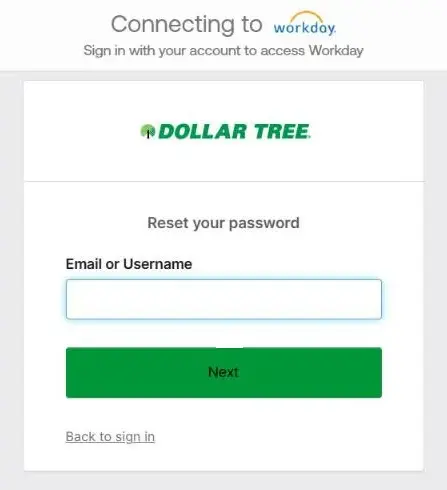
- Go to the sign-in page through the Associate Information Center.
- Click Forgot password?
- On the Reset your password screen, enter your email or username and click Next.
- Choose how to get your reset code or link if you’re given a choice, such as email or text.
- Follow the link or enter the code.
- Create a new password that meets the rules shown on the screen.
- Go back to the sign-in page and log in with the new password.
The reset only works if your account already has a recovery email or phone number on file. If you never set one up, or the reset message never arrives, ask your manager for Dollar Tree’s internal IT or HR help route.
Unlocking a Locked Account
Accounts usually lock after too many wrong passwords in a row.
- Stop trying to sign in. More attempts can keep the account locked.
- Click Unlock account? on the sign-in page.
- Enter your username and follow the verification steps.
- Sign in once with the correct password.
If the unlock option doesn’t work, your account may be locked or disabled on Dollar Tree’s side. This can happen during a transfer, leave of absence or job change. Only Dollar Tree can fix that, so contact your manager or HR.
If You Forgot Your Username
There is no “Forgot username” link on the sign-in page. Look at the hiring or onboarding message that gave you your login. If you can’t find it, ask your store manager or HR to confirm your username. Don’t guess different ID formats. Every wrong guess counts toward a lockout.
First-Time Login for New Hires
New associates usually get Workday access after their hiring paperwork is complete and their employee record is active.
- Wait for your login details from Dollar Tree. They often come by email or from your manager.
- Sign in through the Associate Information Center, not a link someone texted you.
- If you are asked to create a new password or set up a verification method, do it right away.
- Add your recovery email and phone number if Workday or the sign-in page asks for them. This makes future password resets much easier.
- Set up direct deposit before your first payday if you don’t want a paper check or pay card.
- Check that your name, address and tax withholding are correct.
If your login doesn’t work in the first week, your record may not be active yet. Ask your manager when access should start. For everything else to handle in week one, see what to set up in your first week.
Can Former Employees Use Workday?
Dollar Tree’s Associate Information Center says paystubs in Workday are for current associates. Once you leave, expect your Workday access to end.
Former associates can still:
- Get paystubs dated before August 26, 2025 at Doculivery (mydoculivery.com/dollartree)
- Change their mailing address through Doculivery, which matters for W-2 delivery
- Get W-2s through the W-2 link in the Associate Information Center
For paystubs dated after August 26, 2025 that you can no longer reach, email the Payroll Department at paystub@dollartree.com. Include your full name and the pay dates you need. Never email your full Social Security number or password.
Tip: before your last day, sign in to Workday and download your recent paystubs. It’s much easier than asking for them later.
Workday Login Problems and Fixes
| Problem | Likely cause | What to do |
|---|---|---|
| Ended up on a Workday page that doesn’t know you | Wrong company’s Workday page from a search result | Start from the Associate Information Center |
| Typed your shopping account details | Customer account, not employee account | Use your Dollar Tree employee username |
| “Unable to sign in” or wrong password message | Typo, Caps Lock, old password | Check carefully once, then use Forgot password? |
| Account locked | Too many wrong attempts | Use Unlock account?, then contact your manager |
| Reset email or text never arrives | No recovery info on file, spam folder, or old contact details | Check spam, then ask your manager for the IT/HR route |
| Sign-in page loops back to itself | Old cookies or a stale bookmark | Clear cookies for dollartree.okta.com and myworkday.com, then start again from the Associate Information Center |
| Signed in but paystub is missing | Pay date is before Aug 26, 2025 | Check Doculivery |
| Pay statement PDF won’t open | Pop-up blocker or phone PDF viewer | Allow pop-ups for myworkday.com, or try a computer |
| Works on computer, not on phone | Old browser or saved data on the phone | Update the browser, or try a private/incognito tab |
| New hire can’t sign in | Employee record not active yet | Ask your manager when access starts |
| Can’t sign in after leaving | Current-employee access has ended | Use Doculivery or email paystub@dollartree.com |
| Sign-in page looks different or asks for your SSN | Possibly a fake page | Close it and start again from dollartree.com |
If Workday is down right before a payday, don’t panic. Your pay is processed whether or not you can see the paystub that day.
How to Get Help With Workday
Pick the right contact for the problem:
| Problem | Contact |
|---|---|
| Can’t sign in, locked out, wrong username | Store manager first, then the IT or HR route they give you |
| Paystub missing or wrong | paystub@dollartree.com, or Create a Case in Workday |
| Paystubs before Aug 26, 2025 | Doculivery |
| Benefits or mytree sign-in | mytree support center: 1-855-245-7994, Monday–Friday, 8 a.m.–8 p.m. ET |
| Schedule or shift questions | Store manager (and Compass) |
Creating a case in Workday: If you can sign in but something is wrong with your pay, use the Create a Case in Workday link in the Associate Information Center’s paystub section. It opens Workday’s help center. Describe the problem clearly, such as the pay date, what you expected and what you see. Then keep the case number for follow-up.
Don’t call Dollar Tree’s customer service line for a Workday password. Customer service handles shopping questions, not employee accounts.
How to Spot a Fake Workday Login Page
Your Workday login unlocks your pay and bank details, so treat it like a bank password.
- Only sign in on pages whose address contains dollartree.okta.com or myworkday.com/dollartree.
- Start from dollartree.com, not from a link in a text, social media post or unknown email.
- The real sign-in page asks only for a username and password. It does not ask for your Social Security number, bank PIN or card number.
- Never give your password or verification code to anyone, including someone who says they’re from HR or IT.
- Don’t save your password on a shared store computer.
- If your direct deposit changes without you doing it, tell your manager and Payroll right away.
Common Questions
Is Dollar Tree Workday the same as Compass?
No. Workday is for pay and personal details. Compass is for your work schedule. They are separate logins.
Can I see my schedule in Workday?
Dollar Tree’s public pages don’t list schedules as a Workday task. Use Compass to check your shifts.
Why does the Workday login page say Okta?
Dollar Tree uses Okta as its sign-in service. When you open Dollar Tree’s Workday link, Okta checks your username and password, then sends you into Workday.
Is my Workday username the same as my Compass username?
Not necessarily. Use the username Dollar Tree gave you for each system. If you’re not sure, ask your manager.
Where are my paystubs from before August 2025?
In Doculivery at mydoculivery.com/dollartree. Workday has paystubs from August 26, 2025 onward.
Can Family Dollar employees use this login?
Family Dollar has its own associate resources. Family Dollar workers should use the links their own employer gives them.
How long does a password reset take?
The reset email or text usually arrives within minutes. If nothing arrives, check your spam folder, then ask your manager.
Can I use Workday from home?
Yes. The Associate Information Center and the Workday sign-in page are on the public internet. You still need your own active Dollar Tree login.
The Bottom Line
Start at Dollar Tree’s Associate Information Center, click the Workday task you need, and sign in on the dollartree.okta.com page with your employee username and password. Use Forgot password? or Unlock account? if you get stuck, and ask your manager if those don’t help. Remember: Workday is for pay and personal details. Compass is for your schedule, and mytree is for benefits.


Pingback: Dollar Tree Employment Verification: The Work Number, Code & Steps (2026)