
Dollar Tree Compass is the browser-based schedule portal for eligible Dollar Tree associates. Sign in on Dollar Tree’s official Compass page at compassmobile.dollartree.com/pwm/action/employeeLogin to view your work schedule. Enter the username and password issued for your employee account. Compass does not serve as the main paystub, W-2, or benefits portal. Current paystubs are in Workday, tax forms use Paperless Employee, and benefits use mytree.
Independent-site disclosure: Dollar-TreeCompass.net is an independent information website. It does not operate Dollar Tree’s systems, create employee accounts, reset passwords, or collect login details. Enter private information only on an employer-confirmed website.
Sources checked for this guide: the Compass sign-in screen, Dollar Tree’s official payroll and W-2 pages, mytree, Workday guidance and the official app stores.
Popular guides
Compass at a Glance
| Item | Verified information |
|---|---|
| Employer | Dollar Tree, Inc. |
| Portal name | Dollar Tree Compass or Compass Mobile |
| Main purpose | View an associate’s Dollar Tree work schedule |
| Official login | Compass Mobile employee login |
| Login fields shown | Username and password |
| Public sign-up page | No public Compass sign-up option was visible when checked |
| Public password-reset page | No self-service reset option was visible on the public Compass screen |
| Mobile access | Use the official website in a mobile browser |
| Official Compass employee app | No Dollar Tree Compass employee app listing was verified in Apple’s App Store or Google Play |
| Current paystubs | Workday for current associates after August 26, 2025 |
| W-2 and address service | Paperless Employee, reached through Dollar Tree’s official pages |
| Benefits | mytree |
The correct domain is dollartree.com, with two letters “l” in “dollar.” The address compassmobile.dollatree.com is misspelled and should not be used.
Which Employee Site Should You Use?
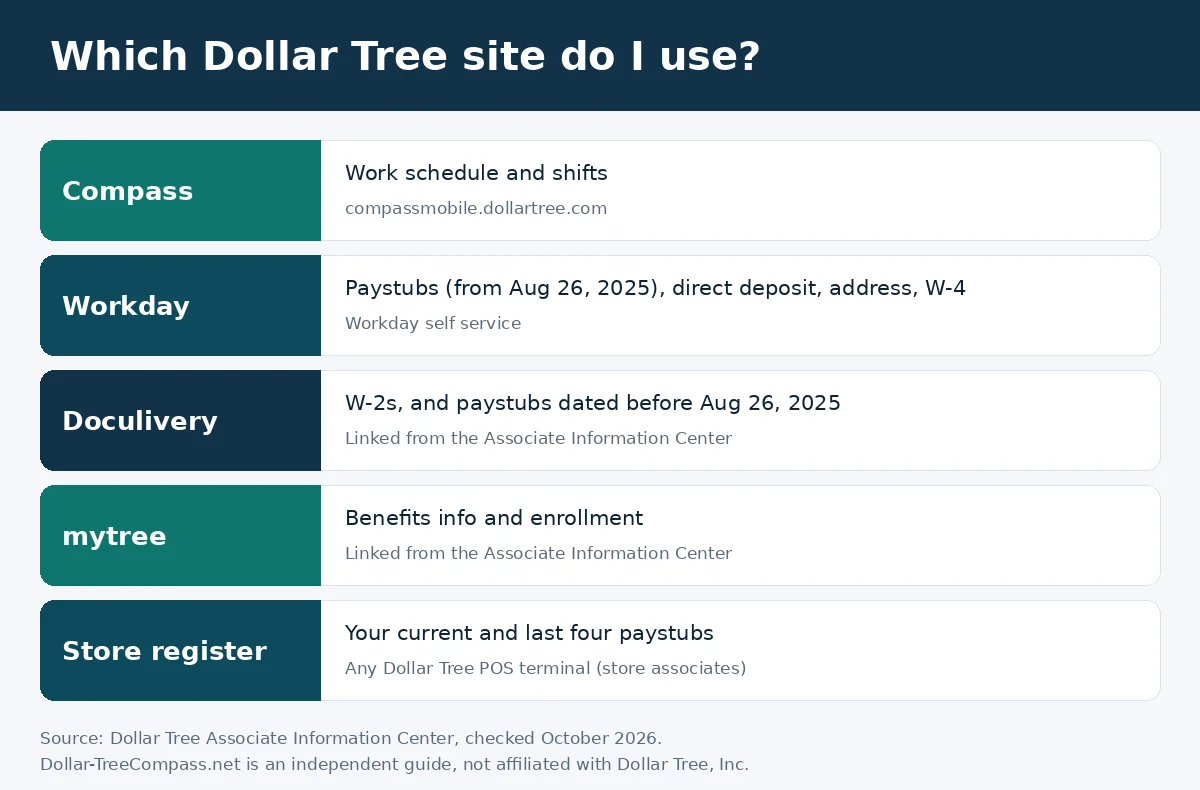
Dollar Tree uses separate systems for separate employee tasks. Do not expect the Compass schedule page to contain every HR service.
| Employee task | Correct route | Important note |
|---|---|---|
| Check a work schedule | Compass Mobile | The live page is titled “Dollar Tree work schedule – Compass Login.” |
| View current paystubs | Workday through the Associate Information Center | Dollar Tree says all current associates can access paystubs in Workday after August 26, 2025. |
| View recent paystubs in a store | Dollar Tree POS terminal | Store associates may view the current and last four paystubs at a Dollar Tree POS terminal. |
| Request older or missing paystubs | Payroll Department at paystub@dollartree.com | Dollar Tree lists this route for earlier copies and paystub problems. |
| View a W-2 or update a tax-form mailing address | Paperless Employee through Dollar Tree’s W-2 page | Current and former associates may need this service. |
| Change address, tax withholding, or direct deposit | Workday self-service | Dollar Tree directs current associates to Workday for these changes. |
| Manage benefits | mytree | Benefits and eligibility depend on the plan and employee group. |
| Find an internal job | Jobs Hub in Workday | Dollar Tree’s careers FAQ directs current associates to Workday. |
| Request employment verification | Link in the Associate Information Center | Use the employer-provided verification route. |
What Is Dollar Tree Compass?
Dollar Tree Compass is a workforce schedule service for eligible associates. Many associates simply call it Compass Mobile.
The public login page identifies itself as an employee login and asks for a username and password. It does not display public registration, password-reset, payroll, or W-2 controls before sign-in.

Some independent websites describe Compass as one large HR portal. That description is misleading. Dollar Tree’s current public information sends employees to different systems for schedules, pay, tax documents, benefits, profile changes, and internal jobs.
Who Can Sign In?
Compass is intended for eligible Dollar Tree associates who have an active employee login. Access and permissions may differ for store associates, managers, distribution-center employees, and corporate workers.
New employees
A new hire needs an active employment record and credentials issued or confirmed by Dollar Tree. A public visitor cannot create a Compass account from the login screen.
If your username does not work, ask your manager to confirm that your record is active and that you are using the correct scheduling system for your location.
Current employees
Current employees with valid access can use Compass for schedule information. Workday, Paperless Employee, and mytree handle other employee tasks.
Managers and supervisors
The public Compass page shows one employee login, not a separate supervisor login. A manager may see different tools after sign-in because access depends on the account’s role.
Former employees
Former employees should not use Compass to retrieve payroll or tax records. Use the official paystub and W-2 routes in this guide. Normal Workday or schedule access may end when employment ends.
Family Dollar and other worker groups
Family Dollar has its own Associate Information Center even though Dollar Tree, Inc. owns the business. Contractors, agency workers, and workers employed by another organization should use the system supplied by their direct employer.
What You Need Before You Sign In
Have these ready before you sign in.
- An active Dollar Tree employee record
- The username issued or confirmed for Compass
- Your current password
- A secure internet connection
- A current browser with JavaScript and cookies enabled
- Access to your manager or internal support route if the account is not active
The live page labels the first field Username. It does not publicly state that every employee must use an employee ID, email address, or network ID. Use the exact credential supplied for your account.
Do not guess your username. Do not send your password, Social Security number, W-2, paystub, bank information, or security code to an independent guide website.
Signing In on a Computer
On a computer, you use the same official website as on a phone.
- Open a current browser on a private computer.
- Type
https://compassmobile.dollartree.com/pwm/action/employeeLoginin the address bar. - Confirm that the domain ends in
dollartree.combefore entering anything. - Enter your assigned username in the Username field.
- Enter your current password in the Password field.
- Select the login button once.
- Wait for the schedule dashboard to load.
- Review the date or week shown before relying on a shift.
- Sign out when finished, especially on a shared device.
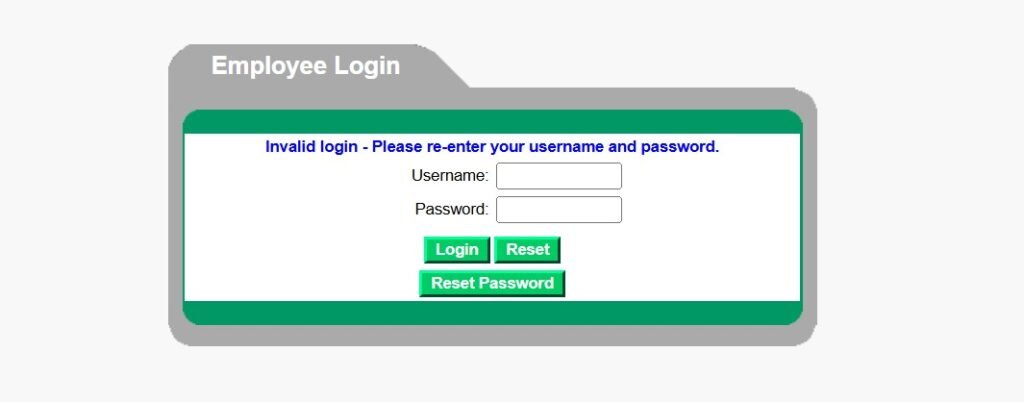
The live screen can show “Invalid login – Please re-enter your username and password” when the credentials are rejected. Repeated guesses may make the problem harder to resolve. Stop and contact your manager if you are not sure which credentials to use.
Signing In on Your Phone
You don’t need a separate app to open your schedule on a phone.
- Open Chrome, Safari, or another current mobile browser.
- Enter the official Compass URL directly.
- Check the full domain before signing in.
- Enter your assigned username and password.
- Tap the login button once.
- Turn the phone sideways or use the browser’s zoom controls if part of the schedule is hard to read.
- Sign out and close the tab when you finish.
You can save a browser bookmark or add the official page to your home screen. This creates a shortcut, not an installed employee app.
Is There an App for Android or iPhone?
No official Compass employee app listing could be verified in Google Play or Apple’s App Store when this guide was checked. The official Dollar Tree shopping app is real, but it is for products, weekly ads, store details, and shopping features. It is not the employee schedule app.
Other apps named “Compass Mobile” may belong to unrelated companies. Do not enter Dollar Tree credentials into them. Avoid APK download sites and pages that ask you to install an unofficial schedule app.
First-Time Access for New Associates
The address ending in /pwm/action/employeeLogin is a login page, not a registration page. It has no public sign-up button.
For first-time access:
- Ask your manager when your employee record will become active.
- Confirm which username you should use.
- Follow the private onboarding instructions supplied by Dollar Tree.
- Use only the official Compass URL.
- Change a temporary password only when the employer’s system asks you to do so.
- Complete your first login and confirm that the correct name, store, and schedule appear.
Do not create a DollarTree.com shopping account for this purpose. A customer shopping account does not activate Compass, Workday, payroll, or employee benefits.
Registration, activation, and login are different
- Account activation connects an employee record to authorized system access.
- First-time login uses credentials supplied during onboarding.
- Regular login uses the active username and password.
- Benefits enrollment happens in mytree and is not Compass registration.
- Paperless W-2 registration happens with the tax-document provider and is not Compass registration.
If the system does not recognize a new hire, the manager or HR team must first confirm the employee record. Repeatedly trying different IDs will not activate it.
Forgot Your Password or Username?
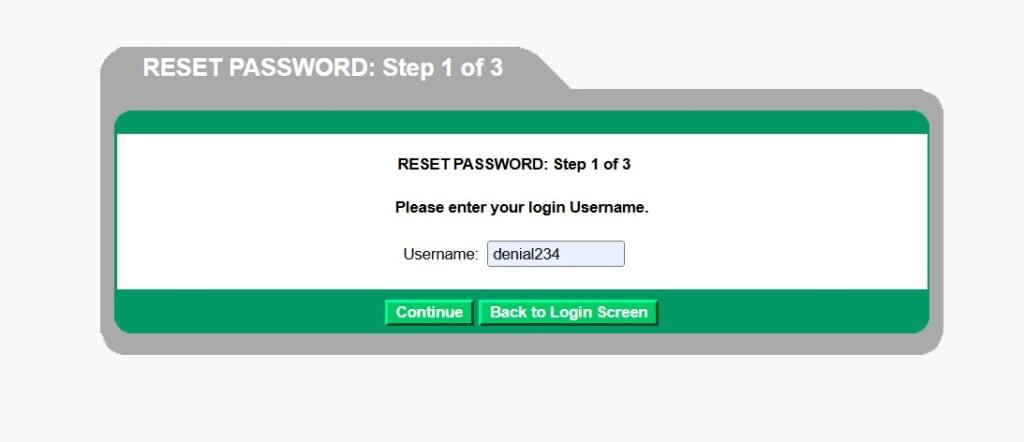
The public Compass login page did not display a verified Forgot Password or Forgot Username link when checked. It also did not show the email-and-security-question reset flow described by some independent websites.
What to do if you forgot your Compass password
- Confirm that you are on the official Compass page.
- Check Caps Lock and the keyboard language.
- Enter the known password once more with care.
- Stop if the same invalid-login message returns.
- Ask your store manager to confirm the approved password-reset or account-unlock route for your location.
- Follow only the private instructions supplied by Dollar Tree.
Do not use public “default password” formulas. Competing pages publish patterns based on names, birth dates, or Social Security digits. Dollar Tree’s live public Compass page does not publish those formulas. Using or sharing them creates a security risk.
What to do if you forgot your username or employee ID?
The Compass page calls the login value a username. An employee ID, payroll ID, company email, and network ID may be different values.
Check the onboarding message or document that gave you system access. If it is unavailable, ask your manager or HR representative to confirm the correct ID after verifying your identity. Do not guess an ID or copy another employee’s format.
Account locked or disabled
An account may fail because of repeated incorrect entries, an inactive new-hire record, a transfer, leave status, or ended employment. Clear browser data only when the page itself is malfunctioning. Browser steps cannot reactivate an employment record or unlock an account controlled by the employer.
How Do I Check My Schedule for Dollar Tree?
Compass is the right place to check your schedule.
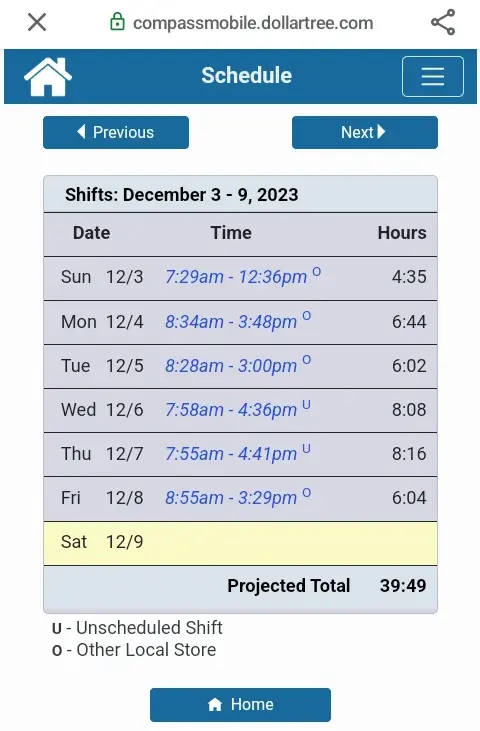
- Sign in at the official Compass employee login.
- Wait for the schedule screen to load.
- Check the week or date shown on the screen.
- Review each shift’s start time and end time.
- Confirm the store, department, or assignment if those details appear.
- Look for a recent update before relying on an older screenshot.
- Ask your manager about any missing, changed, or unclear shift.
The exact dashboard labels can vary. Dollar Tree’s public login page does not show the private post-login menu, so this guide does not invent button names.
Seeing Today’s Shift
When checking today’s shift, confirm the full calendar date and not only the day of the week. A saved screenshot or old browser tab may show a past schedule.
Refresh the official page and compare the result with the posted store schedule or manager’s instructions. If the portal is unavailable, do not assume that you are off work.
Shift swaps, availability, and time-off requests
Public Dollar Tree pages do not clearly confirm that every associate can submit shift swaps, availability changes, sick-time requests, or PTO requests through Compass.
Use an on-screen request option only if it appears in your authorized account and your manager has told you to use it. A submitted request is not the same as approval. Keep following the existing schedule until a manager confirms the change.
Schedule, timecard, and paystub are different
- A schedule shows when you are expected to work.
- A timecard records time worked and may include approved corrections.
- A paystub shows the hours and earnings processed for a pay period.
Report a missed punch or timecard error to your manager as soon as possible. Do not wait until the paystub appears.
Where to Find Your Paystub
Do not use Compass for the main current-paystub process. Dollar Tree states that, after August 26, 2025, all current associates can access their paystubs in Workday through the official Associate Information Center.
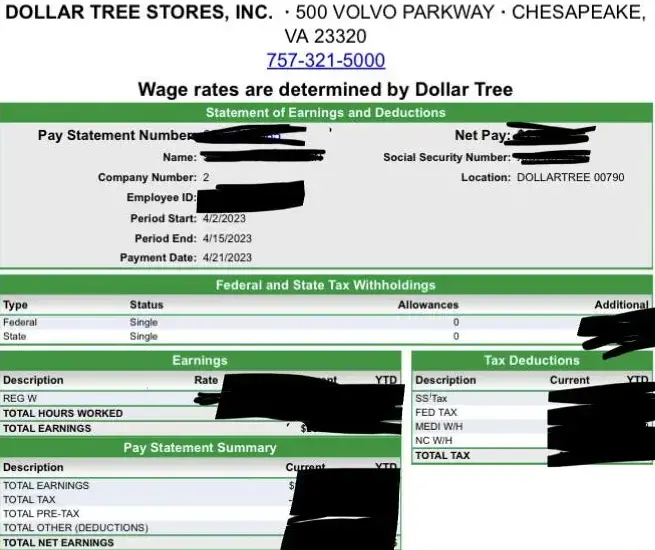
Current associate paystub steps
- Open Dollar Tree’s Associate Information Center.
- Choose the official Workday link for current associates.
- Complete Dollar Tree’s authorized sign-in process.
- Open the pay or paystub area shown in your Workday account.
- Select the correct pay date or pay period.
- Open the pay statement.
- Review the hours, earnings, deductions, taxes, and net pay.
- Use the available PDF, download, or print control.
- Save the file on a private device and sign out.
Workday pages can vary by role and device. Use the labels visible in your authorized account instead of relying on screenshots from another employer.
In-store access to recent paystubs
Dollar Tree says store associates may also access their current and last four paystubs through a Dollar Tree POS terminal. Follow the store’s approved process and protect the printout from other customers and employees.
Earlier, missing, or inaccessible paystubs
For earlier paystubs or a paystub-delivery problem, Dollar Tree directs associates to the Payroll Department at paystub@dollartree.com or to create a case in Workday when that option is available.
Use your work or personal email only as instructed. Never include a password, full Social Security number, bank account number, or a complete paystub in an unverified message.
How to download or print a paystub?
- Open the correct pay statement in Workday.
- Confirm the employee name and pay date.
- Select the PDF, print, or download option displayed.
- Save the file with a clear name such as the pay date.
- Print only on a trusted printer.
- Remove the file from a public or shared computer after printing.
If the PDF does not open, allow pop-ups for the official Workday page, try a current browser, and check the browser’s download folder. Stop if a third-party page asks you to upload a paystub to “unlock” it.
What the Fields on a Paystub Mean?
| Paystub field | Plain-language meaning |
|---|---|
| Pay period | Dates covered by the statement |
| Pay date | Date the payment was issued |
| Regular hours | Non-overtime hours processed |
| Overtime hours | Hours processed under the applicable overtime rule |
| Gross pay | Earnings before taxes and deductions |
| Pre-tax deductions | Eligible deductions taken before some taxes are calculated |
| Taxes withheld | Federal, state, local, Social Security, and Medicare amounts as applicable |
| Post-tax deductions | Amounts removed after taxes |
| Employer contributions | Employer-paid amounts that may appear for a benefit or plan |
| Year-to-date totals | Accumulated amounts for the calendar year |
| Net pay | Amount left after deductions and taxes |
Contact your manager quickly for wrong hours or a missed punch. Contact Payroll for a missing payment, incorrect deduction, or paystub that does not match an approved timecard. This guide does not provide personal tax or payroll advice.
Does Dollar Tree Pay Weekly or Biweekly?
Dollar Tree’s public Associate Information Center does not state one current pay frequency for every employee group and location. Do not use an old search result as your payday calendar. For pay times and your first check, see Does Dollar Tree pay weekly or biweekly? and the 2026 pay period calendar.
Open your latest Workday paystub and check the pay period and pay date. Your offer documents, manager, or Payroll can confirm the schedule that applies to your position. DailyPay is an optional benefit for eligible employees, but access to earned wages does not change the employer’s normal payroll record or paystub.
How to Access a Dollar Tree W-2?
Dollar Tree’s official W-2 information directs associates to Paperless Employee. This is separate from Compass and Workday schedule access.
- Start at Dollar Tree’s W-2 and address information page or Associate Information Center.
- Follow the official Paperless Employee link.
- Sign in to an existing account or use the provider’s current account-creation option if it appears.
- Complete the provider’s identity check on the official site.
- Open the tax-document section.
- Select the correct tax year.
- View, download, and print the W-2.
- Store the file in a secure location.
Paperless Employee registration is for tax and address services. It does not create a Compass schedule account.
W-2 access for former employees
Dollar Tree’s associate FAQ addresses both current and previous employees and directs them to Paperless Employee for W-2 copies. A former worker should keep the mailing address current and use the reprint route on the official FAQ if the online form is missing.
The official W-2 page lists Myinfo@dollartree.com for help accessing the Paperless Employee website. For a W-2 reprint, use the Paymail contact link on Dollar Tree’s Associate Information FAQ.
Missing or incorrect W-2
Employers generally must provide Form W-2 by January 31, or the next business day when the date falls on a weekend or legal holiday. The IRS says to contact the employer first when a W-2 is missing or wrong.
If the form has an incorrect name, address, Social Security number, wages, or tax withholding, ask Dollar Tree Payroll for a correction. Do not edit the W-2 yourself. If the employer does not resolve a missing W-2, follow the current steps on the IRS missing or incorrect W-2 page.
Direct Deposit, Address, and Tax-Withholding Changes
Dollar Tree directs current associates to Workday self-service for address, tax-withholding, and direct-deposit changes.
- Enter Workday through the Associate Information Center.
- Open the relevant pay, personal information, or self-service area.
- Review the existing information before making a change.
- Follow the verification steps shown by Workday.
- Check the effective date and any pending status.
- Save the confirmation without exposing private information.
Enter routing and bank-account details only inside the authorized Workday service. This article and Dollar-TreeCompass.net will never ask for them.
Dollar Tree’s Associate Information Center says former associates can make address changes through the Doculivery route it provides. Former workers should start from the Associate Information Center instead of using an old bookmark.
Dollar Tree Benefits Through mytree
mytree is Dollar Tree’s benefits and enrollment website. It provides benefits information, policies, and resources after authorized sign-in.
Dollar Tree’s public careers information lists possible benefits such as medical and prescription coverage, dental, vision, health savings and flexible spending accounts, life and disability insurance, wellness resources, paid time off, DailyPay, a 401(k), an employee stock purchase plan, and education support.
Eligibility and coverage are not the same for every employee. They can depend on employment status, hours, location, waiting periods, plan rules, and other conditions. The plan documents control when a summary conflicts with the plan.
For mytree access help, Dollar Tree lists 1-855-245-7994, Monday through Friday, 8:00 a.m. to 8:00 p.m. Eastern Time.
Current, New, and Former Associate Access
| User | Best first step | Main limits to remember |
|---|---|---|
| New hire | Ask the manager to confirm activation and credentials | The Compass page has no public sign-up control. |
| Current store associate | Use Compass for schedules and Workday for pay/profile tasks | Recent paystubs may also be available at a store POS terminal. |
| Current manager | Use employer-assigned access | Manager permissions may differ; no separate public supervisor page was verified. |
| Distribution or corporate associate | Follow the system route supplied for the work group | Do not assume store Compass steps apply to every role. |
| Employee on leave or after a transfer | Ask HR or the manager to confirm account status | Access may change when the employment record changes. |
| Former associate | Use official paystub and W-2 routes | Do not depend on normal Compass or current-employee Workday access. |
| Contractor or agency worker | Contact the direct employer | Dollar Tree employee credentials may not apply. |
Why Isn’t Compass Working?
| Problem | Likely cause | Safe action |
|---|---|---|
| Page will not open | Typo, old bookmark, network issue, or temporary outage | Type the official URL directly and try another secure network. |
| “Invalid login” message | Incorrect username or password | Recheck once, then ask the manager to confirm the account. |
| Login button cannot be clicked | Page script did not load, cookies are blocked, or a content blocker interfered | Reload, enable JavaScript and cookies for the official domain, or try a current browser. |
| Button does nothing | Stale page or blocked script | Close the tab, reopen the direct login URL, and try once. |
| Login loop | Old cookies or a stale session | Sign out, clear site data for the official domain, and reopen it. |
| Works on one device only | Browser, cache, or network difference | Update the failing browser and clear only that site’s data. |
| Username not recognized | Wrong ID type or inactive employee record | Ask the manager or HR to confirm the assigned username and status. |
| New-hire access missing | Onboarding record may not be active | Ask the manager when access should begin. |
| Account locked | Too many failed attempts or employer-side restriction | Stop guessing and use the employer-approved unlock route. |
| Schedule is blank | Wrong week, inactive record, or a system update | Refresh, check the date, and contact the manager. |
| Old schedule still appears | Cached page or no new schedule posted | Reload and verify the current schedule with the store. |
| Schedule differs from the store posting | A change may not have synced or been approved | Ask the manager which schedule controls before the shift. |
| Paystub missing in Compass | Wrong portal | Use Workday, the POS option, or Payroll. |
| Workday paystub will not open | Pop-up, browser, or PDF issue | Allow the official download, update the browser, or create a Workday case. |
| W-2 is missing | Wrong year, account issue, or mailing problem | Check Paperless Employee and use Dollar Tree’s W-2 support route. |
| Former-employee login fails | Normal employee access may have ended | Use the former-worker paystub and W-2 routes. |
If a portal failure happens before a shift, contact the store. A broken page does not cancel a scheduled shift.
Correct Support Route for Each Problem
| Problem | Contact or route |
|---|---|
| Compass username, password, or schedule | Store manager first; use the internal HR or IT route the manager provides |
| New-hire record or employee ID | Manager or HR |
| Wrong schedule or shift change | Manager or scheduling lead |
| Missed punch or timecard correction | Manager or timekeeping lead |
| Current paystub | Workday or a Workday case |
| Earlier or missing paystub | paystub@dollartree.com |
| Paperless Employee access | Myinfo@dollartree.com |
| W-2 reprint | Paymail link on Dollar Tree’s Associate Information FAQ |
| Benefits or mytree login | 1-855-245-7994, Monday–Friday, 8 a.m.–8 p.m. ET |
| Employment verification | Official link in the Associate Information Center |
Do not use Dollar Tree’s customer shopping phone line for an employee password. Customer service and employee-system support are different.
How to Avoid Fake Dollar Tree Employee Portals?
- Check the entire web address before entering a username.
- Start from Dollar Tree’s Associate Information Center when possible.
- Do not trust a page because it uses a Dollar Tree logo or says “official.”
- Do not use a login form hosted on an independent guide site.
- Do not install an unofficial Compass APK.
- Do not enter credentials in an unrelated app named Compass.
- Never share a password or verification code.
- Never post an employee ID, paystub, W-2, or schedule screenshot publicly.
- Avoid public computers for pay and tax documents.
- Sign out after using a shared device.
- Report unexpected account changes through an employer-confirmed support route.
HTTPS protects data in transit, but HTTPS alone does not prove that a site belongs to Dollar Tree.
Frequently Asked Questions
Does Dollar Tree have a Compass portal for employees?
Yes. Compass, often called Compass Mobile, is the browser-based schedule portal for eligible Dollar Tree associates at compassmobile.dollartree.com. It works in a phone or computer browser.
How do I log into Compass Mobile?
Open compassmobile.dollartree.com in your browser, enter the username and password issued for your employee account, and sign in. If it fails, see the troubleshooting section above or ask your store manager.
What is the official Compass sign-in link?
Use compassmobile.dollartree.com/pwm/action/employeeLogin. Confirm the dollartree.com domain before entering a username or password.
Can I see my paystubs in Compass?
No. Compass is the schedule login. Current associates use Workday for paystubs after August 26, 2025.
Can I check Compass from home?
The official schedule login is available on the public web. Your account status and role determine what you can see after signing in.
How do I check my Dollar Tree work schedule?
Sign in to Compass, check the week or date shown, and review each shift. Ask your manager about missing or conflicting information.
What is the Dollar Tree employee schedule app?
No official Compass app was verified. Use the Compass website in a mobile browser.
Is the official Dollar Tree shopping app the schedule app?
No. The official shopping app covers products, weekly ads, stores, and shopping tools. It is not Compass Mobile.
Is there a Compass app for Android?
Do not download an APK or unrelated Compass app. Open the official website in Chrome and add a home-screen shortcut if needed.
How do new hires get access to Compass?
The public login page has no sign-up option. A manager or HR must confirm the employee record and first-time access instructions.
Can I sign in without a password?
The live public page asks for a username and password. No public password-free option was verified.
Is there a default Compass password?
Dollar Tree does not publish a default formula on the live public Compass page. Do not use third-party formulas based on a name, birth date, or Social Security digits.
How do I reset a forgotten Compass password?
The public page did not show a self-service reset link when checked. Ask your manager for the current employer-approved reset route.
How do I recover my Compass username?
Check the onboarding information that issued the account. If it is unavailable, ask your manager or HR to verify the assigned username.
Why is the Compass login button not working?
Reload the direct page, enable JavaScript and cookies for the official domain, and try a current browser. Contact the store if the problem affects an upcoming shift.
Why does Compass work on another device but not my phone?
The phone may have stale site data, an old browser, blocked cookies, or a network issue. Update the browser and clear data only for the official Compass site.
When does Dollar Tree update the weekly schedule?
No universal posting time is published on the public Compass page. Ask your manager when schedules are posted at your location.
Can I request time off in Compass?
Use the feature only if it appears in your authorized account and your manager confirms the process. A request is not approved until the manager accepts it.
Can I swap a shift in Compass Mobile?
Public sources do not confirm this feature for every associate. Follow the store’s approval process and keep the existing shift until a manager confirms a change.
How do I check my Dollar Tree paystub?
Current associates should enter Workday through the Associate Information Center. Store associates may also access the current and last four paystubs at a Dollar Tree POS terminal.
How do I get an older Dollar Tree paystub?
Contact the Payroll Department at paystub@dollartree.com or create a Workday case if that option is available.
Where can I get my Dollar Tree W-2?
Use the official Paperless Employee link from Dollar Tree’s W-2 information page or Associate Information Center.
How do former employees get a W-2?
Former employees can use Paperless Employee and the W-2 reprint route on Dollar Tree’s Associate Information FAQ. Keep the mailing address current.
Does Dollar Tree pay weekly or biweekly?
The public Associate Information Center does not publish one current frequency for every group. Check the pay period and pay date on your Workday paystub.
Where do I change direct deposit?
Current associates use Workday self-service for direct-deposit changes. Enter bank details only inside the authorized Workday service.
Where do I access Dollar Tree benefits?
Use mytree. Dollar Tree lists its mytree support center at 1-855-245-7994, Monday through Friday, 8 a.m. to 8 p.m. ET.
Who should I contact when my schedule is wrong?
Contact your store manager or scheduling lead. Do not assume an unclear or missing online shift means you are off work.
Which Dollar Tree site has my paystubs?
Paystubs dated on or after August 26, 2025 are in Workday. Older paystubs are on Doculivery, and store associates can see their current and last four paystubs on any store register. See how to read your paystub.
Can I see my PTO balance in Compass?
Associates report that the Compass desktop view shows PTO balances. If you can’t find it, ask your store manager. See the Compass desktop version.
Is Dollar Tree Compass the same as Family Dollar Compass?
No. Family Dollar uses its own Compass site at compassmobile.familydollar.com. Dollar Tree associates sign in at compassmobile.dollartree.com.
Conclusion
For a schedule, open the official Compass login and confirm the date shown. For pay, tax forms, benefits, or profile changes, start at Dollar Tree’s Associate Information Center and choose the system for that task. If login details or a shift are unclear, contact your manager instead of guessing credentials or relying on an unofficial app.