Short answer: Your Dollar Tree paystub shows what you earned before anything was taken out (gross pay), each tax and deduction, and what landed in your bank (net pay). Current associates find paystubs in Workday. Store associates can also see their current and last four stubs on any Dollar Tree register (POS terminal).
A paystub looks like a wall of numbers the first time. Once you know the four main parts, it takes about a minute to check, and checking every payday is the easiest way to catch a missed shift or a wrong rate.
Where to find your Dollar Tree paystub
According to Dollar Tree’s Associate Information Center:
| Paystub | Where to get it |
|---|---|
| Paid on or after August 26, 2025 | Workday (current associates) |
| Paid before August 26, 2025 | Doculivery (current and former associates) |
| Current stub and last four stubs | Any Dollar Tree POS terminal (store associates) |
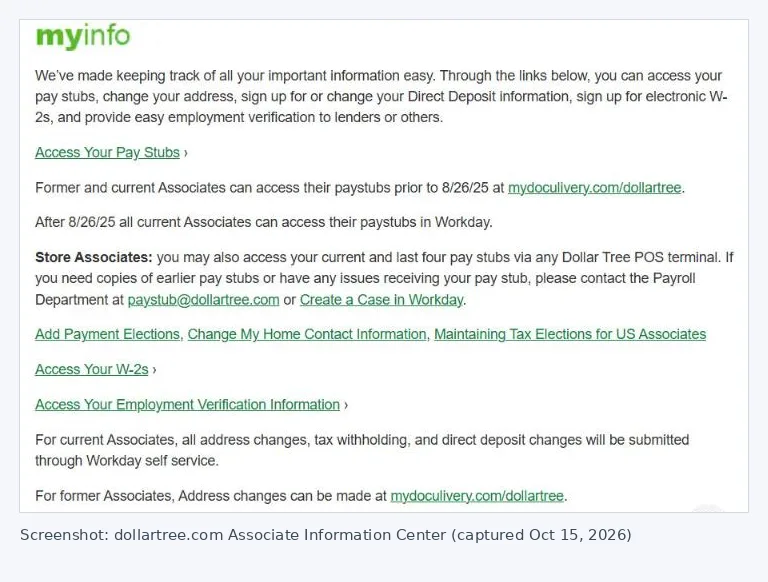
If you need older stubs or something isn’t showing, Dollar Tree says to contact its Payroll Department or create a case in Workday. For older stubs, see our Doculivery guide.
The four parts of a paystub
1. Pay period and pay date
At the top you’ll see the pay period (the dates the hours were worked) and the pay date (when you were paid). Dollar Tree pays every two weeks, so each stub normally covers 14 days. See the 2026 pay period calendar.
2. Earnings
This section lists each kind of pay, with hours, rate and amount.
- Regular: your normal hourly pay.
- Overtime: hours over 40 in a single workweek, paid at 1.5 times your regular rate. See how overtime works.
- Other lines: you might see paid time off, holiday or other earnings codes, depending on what you used or qualified for that period.
Add up the earnings and you get your gross pay.
3. Taxes
| Line | What it is |
|---|---|
| Federal income tax | Based on your W-4 and how much you earned |
| Social Security (OASDI) | 6.2% of your Social Security wages |
| Medicare | 1.45% of your Medicare wages |
| State and local tax | Depends on where you live and work. Some states have none. |
Social Security and Medicare together take 7.65% of most paychecks. Federal and state income tax vary from person to person, which is why two coworkers with the same hours can take home different amounts.
4. Deductions and net pay
Deductions are anything else taken out, such as health insurance premiums or retirement contributions. Some come out before tax (they lower your taxable pay) and some after tax.
What’s left after taxes and deductions is your net pay, the amount deposited in your bank.
What “YTD” means
Every line usually has two amounts: this period and YTD (year to date). YTD is the running total since January 1. Your final YTD numbers for the year should match your W-2, which makes the last paystub of the year a handy check. See when Dollar Tree W-2s come out.
A quick 1-minute paystub check
- Hours: do the regular and overtime hours match what you actually worked?
- Rate: is your hourly rate right, including any recent raise?
- Overtime by week: if one week had more than 40 hours, is there an overtime line?
- Deductions: did a new deduction appear that you don’t recognize?
- Deposit account: is the money going to the right bank account?
If something’s wrong, tell your store manager first. If it isn’t fixed on the next check, contact payroll through Workday.
Quick answers
Where do I see my Dollar Tree paystub now?
In Workday, for pay dated on or after August 26, 2025. Older stubs are on Doculivery.
Can I see my paystub at work?
Dollar Tree says store associates can view their current and last four paystubs on any store POS terminal.
Why is my net pay different from my coworker’s?
Different W-4 choices, state taxes and deductions all change net pay, even with the same hours.
How do I get older Dollar Tree paystubs?
Paystubs dated before August 26, 2025 are on Doculivery. If something is missing, Dollar Tree says to contact its Payroll Department or create a case in Workday.
Can I print or download my paystub?
Open the paystub in Workday or Doculivery and use your browser’s print or “Save as PDF” option.
How do I get my paystubs after leaving Dollar Tree?
Paystubs dated before August 26, 2025 are on Doculivery, which Dollar Tree says former associates can use. For later stubs or anything missing, contact Dollar Tree’s Payroll Department.
How do I contact Dollar Tree payroll?
Dollar Tree’s Associate Information Center lists the Payroll Department email paystub@dollartree.com, or current associates can create a case in Workday.
Dollar-TreeCompass.net is an independent guide and is not affiliated with Dollar Tree, Inc. Your paystub, Workday and Dollar Tree HR are the final word on your own pay and records.