Short answer: Compass works in any web browser, so the “desktop version” is simply Compass opened on a computer, or on a phone with your browser’s Request desktop site option turned on. Associates report the desktop view shows more detail than the phone layout, such as PTO balances and individual time punches. What you see can depend on your role and store.
Compass, often called Compass Mobile, is the schedule portal for Dollar Tree associates at compassmobile.dollartree.com. It was built for phones, but many people prefer the bigger desktop layout. Here’s how to get to it and what to expect.
Mobile view vs desktop view
| Mobile view | Desktop view | |
|---|---|---|
| Where | Phone browser | Computer browser, or phone with “Request desktop site” |
| Best for | A quick look at this week’s shifts | Reading more detail on one screen |
| What associates report seeing | Schedule | Schedule plus extra details such as PTO balance and time punches |
| Sign-in | Same username and password | Same username and password |
The extra details come from what associates have shared publicly, including a widely read Reddit thread in r/DollarTree. Dollar Tree doesn’t publish a feature list, and screens can change, so treat it as a guide rather than a promise.
How to open the Compass desktop version on a computer
- Open Chrome, Edge, Safari or Firefox on your computer.
- Type compassmobile.dollartree.com into the address bar yourself. Check the spelling: “dollar” has two Ls.
- Sign in with the username and password issued for your employee account.
- Bookmark the page so you don’t have to search for it next time.
Avoid clicking “Compass login” links in ads or random search results. Typing the address yourself is the safest way to make sure you’re on Dollar Tree’s real site.
How to get the desktop view on your phone
If you only have your phone, you can ask the browser for the desktop layout.
| Phone browser | How to switch |
|---|---|
| Chrome (Android or iPhone) | Tap the three-dot menu, then turn on Desktop site |
| Safari (iPhone) | Tap the aA button in the address bar, then Request Desktop Website |
| Samsung Internet | Tap the menu, then Desktop version |
The page will be small, so pinch to zoom. Switch the setting off again when you’re done, or other sites will load in desktop mode too.
Desktop version not loading?
- Check the address. A misspelled address, such as “dollatree”, won’t take you to Dollar Tree.
- Try a different browser. If Chrome fails, try Edge, Safari or Firefox.
- Clear the site’s cookies and cache, then sign in again.
- Turn off VPNs or ad blockers for the page.
- Still stuck? Your store manager can confirm your account is active. See our full Compass not working guide.
What the desktop version can’t do
Compass is for your schedule. Other employee tasks live in other systems:
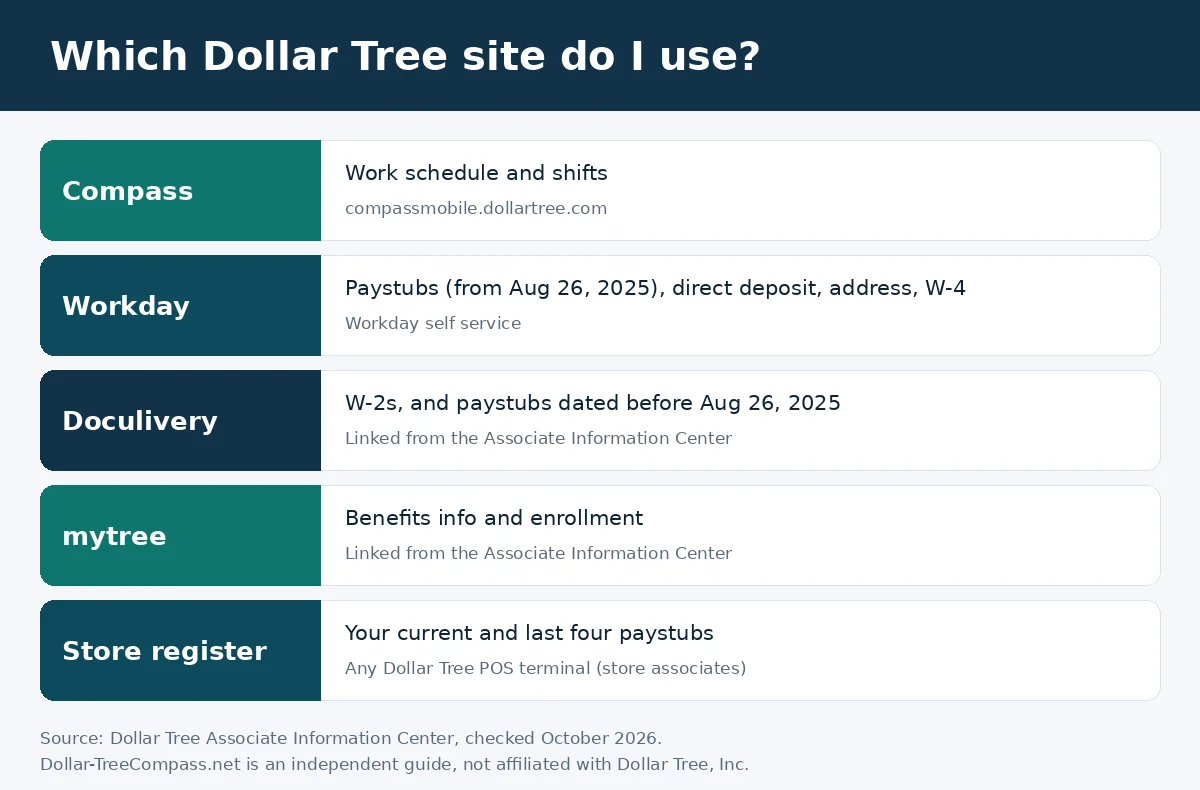
- Paystubs, direct deposit, address and W-4 are in Workday. See how to read your paystub.
- W-2s are linked from the Associate Information Center. See Dollar Tree W-2s.
- Benefits are in mytree. See Dollar Tree employee benefits.
Quick answers
Is there a desktop version of Dollar Tree Compass?
Yes. Compass is a website, so it opens on a computer browser. Phones can also show the desktop layout with the browser’s “Request desktop site” option.
Is the Compass desktop login different from the mobile login?
No. You use the same username and password.
Can I see my PTO in Compass?
Associates report that the desktop view shows PTO balances. If you don’t see it, ask your store manager or check Workday.
Is there a Dollar Tree Compass app to download?
Compass runs in your web browser. Be careful with “Compass app” downloads from outside Dollar Tree, and never enter your login on unofficial sites.
Can I see my past time punches in Compass?
Associates report that the desktop view lists individual time punches. For an official record of your hours, ask your store manager or payroll.
Dollar-TreeCompass.net is an independent guide and is not affiliated with Dollar Tree, Inc. Your paystub, Workday and Dollar Tree HR are the final word on your own pay and records.