
If you are a Dollar Tree associate and need to access your paystub online, the Doculivery system is the secure platform you use. This step-by-step guide will help you understand how to log in, retrieve your User ID, reset your password, and access your digital pay statements with ease.
What is Doculivery Dollar Tree?
Doculivery is an online portal used by companies like Dollar Tree to give employees secure access to their electronic paystubs, direct deposit information, and tax forms (such as W-2s).
How to Log In to the Doculivery Dollar Tree Portal?
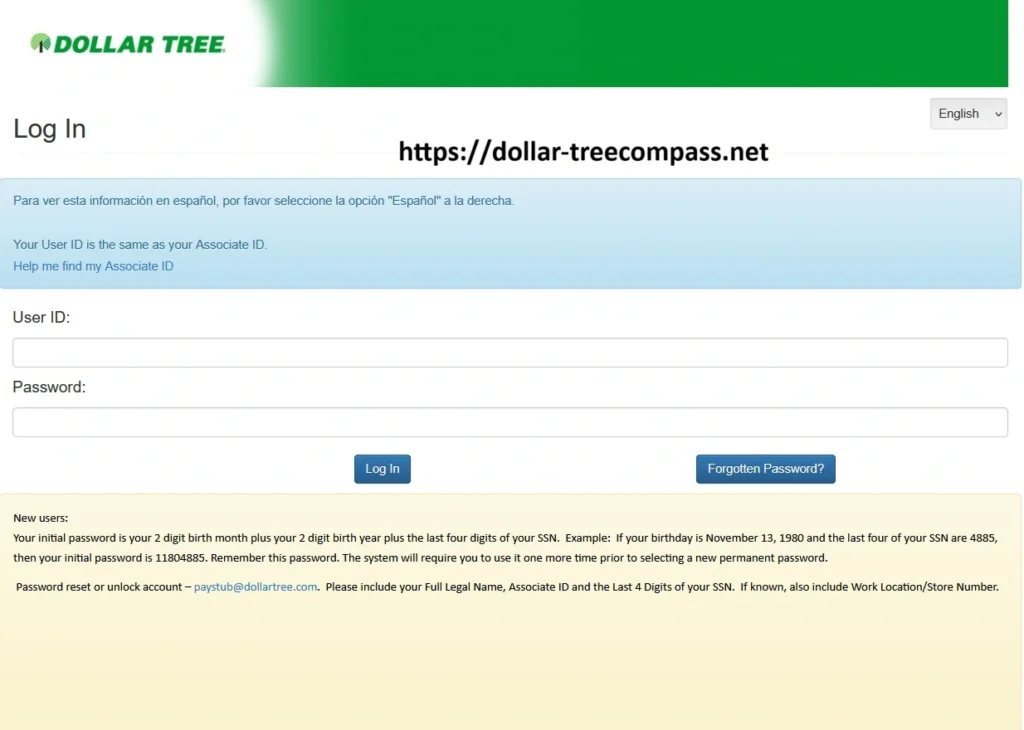
Step 1: Visit the Doculivery Login Page
Go to the official Doculivery portal for Dollar Tree.
Step 2: Enter Your User ID
- Your User ID is the same as your Associate ID.
- If you do not know your Associate ID, click the “Help me find my Associate ID” link on the page.
Step 3: Enter Your Password
- Use the temporary password or sign-in steps shown on the official page, or the ones your manager or HR gives you. Never share your password or Social Security number with anyone, including this website.
- You will be asked to change your password after your first login.
Step 4: Click Log In
Once your credentials are entered, click “Log In” to access your paystub dashboard.
Forgotten Password or Locked Account?
If you forget your password or get locked out.
- Email: paystub@dollartree.com
- Include the following information:
- Your Full Legal Name
- Your Associate ID
- Use the temporary password or sign-in steps shown on the official page, or the ones your manager or HR gives you. Never share your password or Social Security number with anyone, including this website.
- (Optional) Store Number or Work Location
A Dollar Tree payroll support representative will help reset your account.
Changing Your Password
Once logged in with your initial password:
- The system will prompt you to set a new permanent password.
- Choose a strong, memorable password.
- Save it somewhere secure.
How to View and Download Your Paystub Using Doculivery?
- After login, navigate to the “Paystub” section.
- Choose the pay period you wish to view.
- Click to download or print the paystub for your records.
Spanish Language Option
If you prefer to view the portal in Spanish:
- Simply select “Español” from the top-right corner of the page.
Quick Summary Table
| Feature | Details |
|---|---|
| Portal Name | Doculivery |
| Website | Dollar Tree Doculivery Paystub System |
| User ID | Same as your Associate ID |
| Initial Password | Use the sign-in steps on the official page |
| Password Help | Email paystub@dollartree.com |
| Spanish Option | Available via “Español” button |
Tips for Secure Access
- Always log out after checking your paystub.
- Never share your Associate ID or password.
- Update your password regularly.
Why Use Doculivery?
- Instant access to your paystub anytime, anywhere.
- Paperless system saves time and the environment.
- Safe and secure, using your personal login.
FAQs
Where can I find my Associate ID?
It is usually found on your paystub or can be retrieved via the “Help me find my Associate ID” link on the login page.
Can I use the same login on mobile?
Yes, the Doculivery system is mobile-friendly.
What if I enter the wrong password too many times?
Your account may be locked. Contact paystub@dollartree.com to reset it.
Is Doculivery only for Dollar Tree employees?
No. Other companies also use it, but this login portal is specific to Dollar Tree.
Final Thoughts
Accessing your Dollar Tree paystub online through Doculivery is simple and secure. Just use your Associate ID and initial password format, then follow the prompts to update your credentials. For any issues, the payroll team is just an email away.
Need help? Do not hesitate to reach out to paystub@dollartree.com with your details.
What is on Doculivery now?
According to Dollar Tree, Doculivery holds paystubs dated before August 26, 2025 and links to W-2s. Former associates can also update their address there. Newer paystubs are in Workday.
Can former Dollar Tree employees use Doculivery?
Yes. Dollar Tree says former and current associates can access paystubs from before August 26, 2025 on Doculivery.